
Short answer: Attribution means knowing which campaign brought in the customers who actually paid. For a growing business, you don’t need complex models to get there. Tag the source of every lead, track each lead through booked, showed and sold in your CRM, record the sale value, and then judge every campaign by cost per sale, not cost per lead.
Most owners can tell you how many leads they got last month. Far fewer can tell you which ad brought in the five customers who paid the most. That gap is where budgets leak. Money keeps going to the campaign with the cheapest leads, even when those leads never buy. This guide covers what to track, how to connect a lead to a closed deal, how to feed that data back into your ads, and what to do with the answers.
1. Why your ad dashboard can’t tell you which ad made the sale
Ad platforms see what happens on the platform: impressions, clicks, form fills, maybe a purchase on your website. They don’t see what happens after the lead reaches you. They don’t know if you called back in two minutes or two days, if the lead booked, if they showed up, or if they paid $300 or $30,000.
So the ads manager shows symptoms, not the full story. A campaign can look great on cost per lead and lose money. Another can look expensive and be your best source of revenue.
There’s a second trap. If leads sit for an hour before anyone calls, they cool off, and the campaign that sent them looks like it brings “bad leads”. The lead wasn’t bad. The response time was slow. Good attribution includes your own follow-up, not just the ads.
2. What to track: five stages for every lead
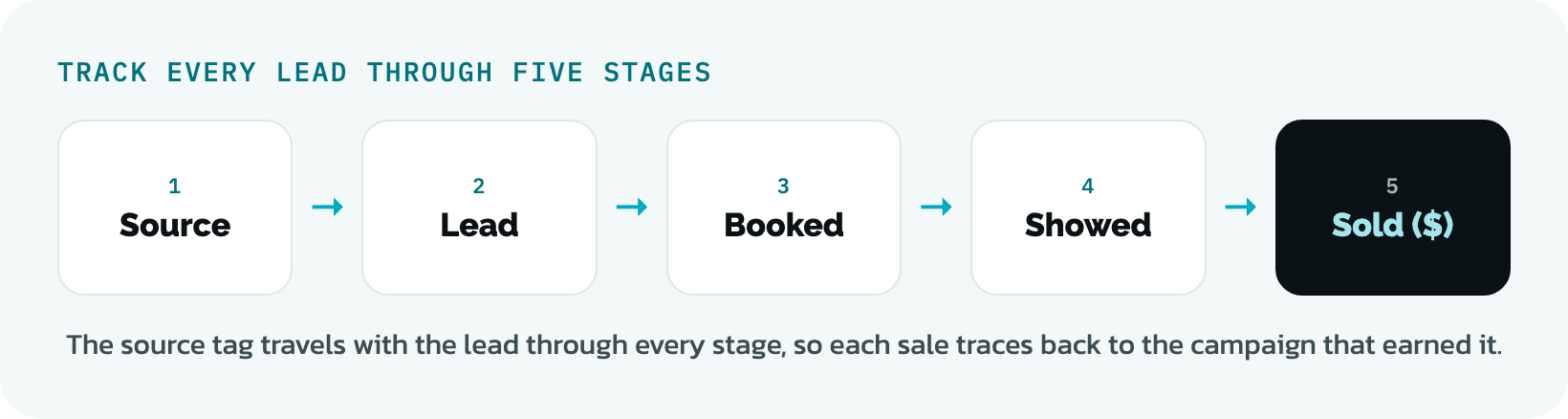
Track every lead through the same chain, and keep the source attached the whole way:
- Source: the platform, campaign and ad the lead came from (or “Google search”, “referral”, “walk-in”).
- Lead: name, phone, email, and when they came in.
- Booked: did they book a call, consult, estimate or appointment?
- Showed: did they actually show up or pick up?
- Sold: did they buy, and for how much?
From those five stages you get the numbers that matter: cost per lead, cost per booked appointment, cost per sale, and revenue per campaign. Cost per lead is the least useful of the four on its own.
If you sell online, the chain is shorter (visit, add to cart, checkout, purchase), but the rule is the same. Track every step, not just the last click.
3. How to connect a lead to a closed deal
This is the practical part. There is no single tool that does it for you. It’s a few simple habits that work together.
Capture the source at the moment the lead comes in.
- Use tracking tags (UTM parameters) on every ad link, so your website form knows which campaign sent the visitor.
- Pass those tags into hidden fields on your forms, so the source lands in the CRM with the lead.
- Use lead form ads where they fit. The platform already knows which ad the form came from.
- Use a separate tracking phone number per channel if a lot of your leads call instead of filling out a form.
- For referrals and walk-ins, ask “How did you hear about us?” and log the answer.
Set up conversion tracking properly. Install the Meta pixel and Google conversion tracking, and check that they fire on the actions that matter: form submits, booked appointments, add to carts, purchases. Optimize campaigns for those actions, not for engagement. A boosted post that collects likes gives you almost no data you can use, because likes are not leads.
Lumiére Lash, an online lash brand, is a good picture of what correct tracking makes possible. We set up conversion pixels to track all actions, then built audiences from visitors, add to carts and past buyers. Sales went from about $2,000 a month to $10,000 in month one and $30,000 in month two.
Keep one pipeline in your CRM. Every lead goes into the same pipeline with the same stages: new, contacted, booked, showed, won, lost. When a deal closes, mark it won and enter the real sale value. If your team is overloaded, this is the first thing that slips. Notes stop getting logged, deals sit in the wrong stage, and your attribution goes dark right when you need it most. Automating the first reply and the stage changes helps (see our CRM automation page).
4. Send closed-deal data back to the ad platforms
Once your CRM knows which leads turned into customers, you can share that back with the ad platforms so they find more people like your buyers, not more people like your clickers.
- Optimize on deeper events. Report booked appointments or closed sales back to Meta and Google as conversions (often called offline or CRM conversions), so the algorithm learns from buyers.
- Build audiences from your best customers. Upload a list of your highest-value clients and build lookalike audiences from it.
- Exclude people who already bought from prospecting ads, so you’re not paying to reach them again.
If you’re in a regulated field like healthcare or insurance, check what customer data you’re allowed to share before you upload any list.
Flow International Group, a life insurance agency in Miami, came to us with no view of which ads produced closed deals and a cost per lead that rose every time they spent more. We built custom audiences and lookalikes from CRM data on their highest-value clients and optimized campaigns on closed-sales data instead of clicks. In 4 months, $248,992 in ad spend brought in $5,023,186 in cash collected.
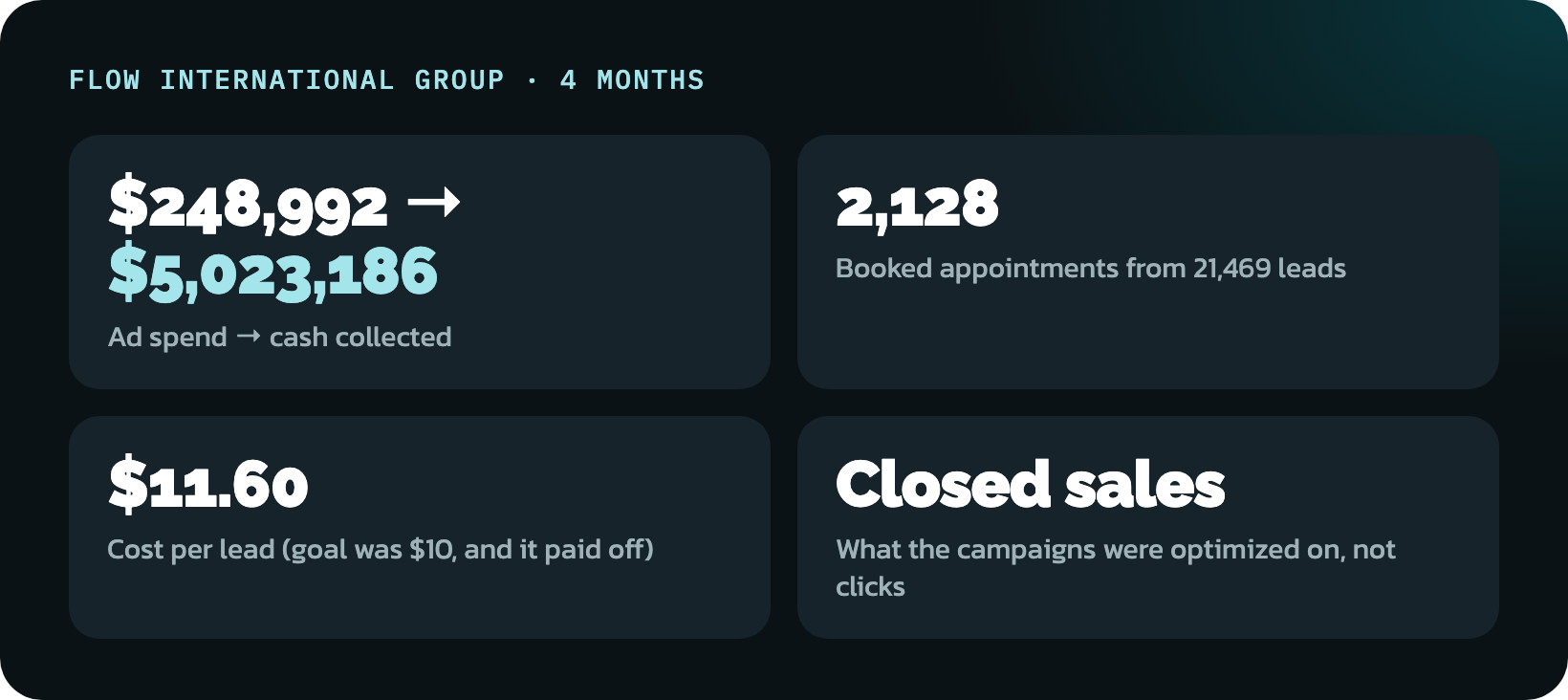
Note the cost per lead in that story: $11.60, above the client’s $10 goal. Judged on cost per lead alone, that looks like a miss. Judged on cost per sale and cash collected, it was the right call.
5. What to do with the numbers
Attribution is only worth the effort if it changes where the money goes. Once a month, look at each campaign’s cost per sale and revenue, then:
- Move budget toward the campaigns with the best cost per sale, even if their leads cost more.
- Fix or cut campaigns that produce leads but no sales. First check your follow-up on those leads. If speed and follow-up were fine, the campaign is the problem.
- Compare channels by revenue, not by clicks. Search, retargeting and social ads play different roles, and each should be judged on what it brings in.
- Give tests enough time and data before you decide. A week of five leads tells you very little.
Example (round numbers, not a client): Campaign A brings leads at $20 each, but only 1 in 50 buys, so each customer costs $1,000. Campaign B brings leads at $100 each, and 1 in 4 buys, so each customer costs $400. Campaign B looks five times more expensive on the dashboard and is more than twice as profitable.
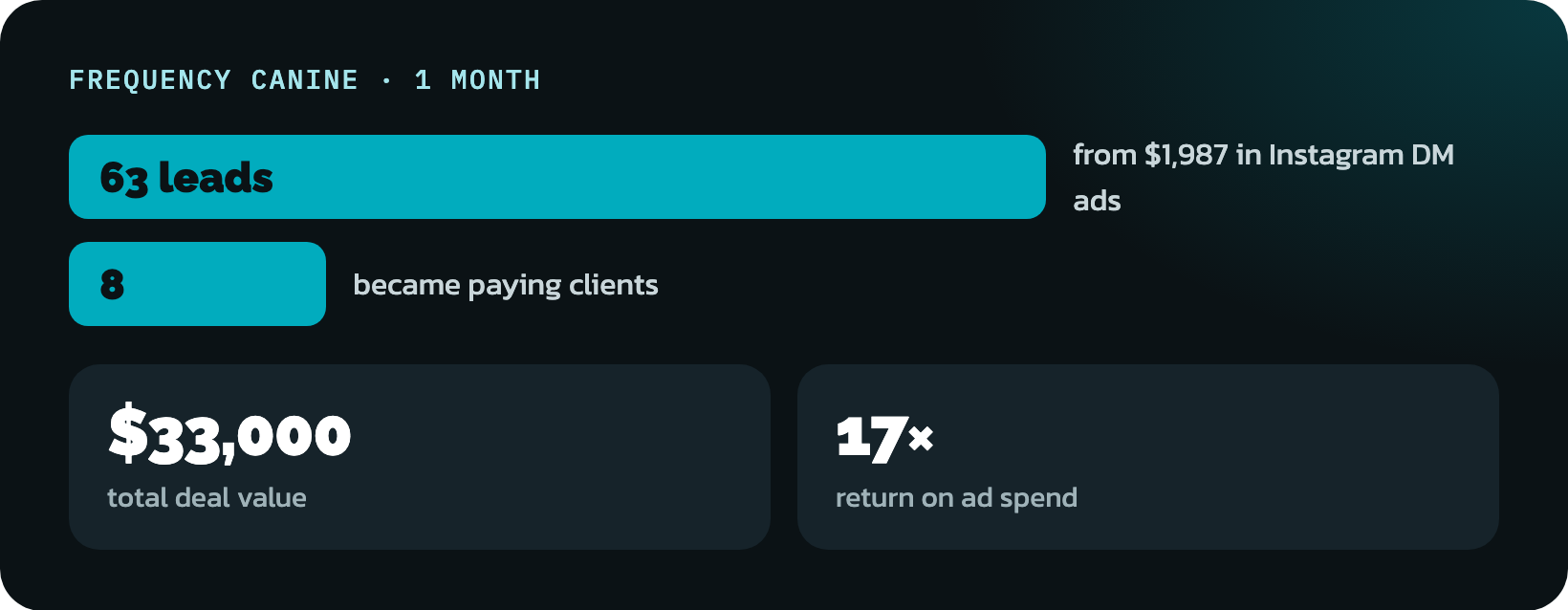
Frequency Canine, a dog trainer in the Florida Panhandle, shows why this matters for small accounts too. In one month, $1,987 in Instagram DM ad spend brought 63 leads. 8 of them became paying clients, worth $33,000 in deals. That’s a 17× return on ad spend, a number you can only see when every lead is followed to a closed deal.
For e-commerce, the same idea works per channel. For Matuse, an online wetsuit brand, tracking each channel separately showed that $54K on Google search ads produced over $350K in sales (6.48×), and $42K on Facebook retargeting produced over $173K (4.12×). Knowing that split is what lets you fund each channel with confidence. For more on splitting a budget, see our budget guide.
6. Signs your attribution is broken
- You can say how many leads you got, but not which campaign your last ten customers came from.
- Your CRM has a lot of leads with no source, or “unknown” is your biggest source.
- Deals get closed but never marked won, or the sale value is left blank.
- You judge campaigns by cost per lead, clicks or likes.
- You turn off a campaign that “looks expensive” and revenue drops a month later.
- Results only look clear when you personally go through the leads.
If two or more of these sound familiar, fix the tracking before you change the ads or the budget. More often than not, the leak is in the handoff between the ad and the sale (see finding revenue bottlenecks).
Frequently asked questions
What is marketing attribution, in plain terms?
It’s knowing which ad, campaign or channel brought in each customer who paid you, and how much they spent. It connects your marketing spend to real revenue, not just to clicks or leads.
Which attribution model should a small business use?
Don’t start with models. Start by tagging the source of every lead and recording closed sales in your CRM. Once that’s in place, the question of first-click or last-click matters far less, because you can see actual revenue by campaign.
Why do my ads show more leads than my CRM?
Usually because some leads never make it into the CRM, get entered twice, or come in through a channel that isn’t connected. Check that every form, lead ad and phone number feeds the same pipeline.
Is cost per lead a good way to judge my ads?
Only as an early signal. A cheap lead that never buys is expensive. Judge campaigns by cost per booked appointment and cost per sale, and by revenue.
Can you check if our tracking is set up right?
Yes. In a free live audit, a senior strategist walks through your real ad accounts, tracking and CRM with you and shows the first three fixes.
 Nov 24, 2026How home improvement companies scale lead volume without killing lead quality
 Oct 23, 2026The Attribution Modeling Operator Playbook for CMOs
 Oct 22, 2026The attribution modeling playbook in high spend accounts